Designing Interfaces Around Real User Workflows, Not Just Wireframes
Moving beyond component collections to design calm, ergonomic software that reduces cognitive fatigue and respects the user's attention.
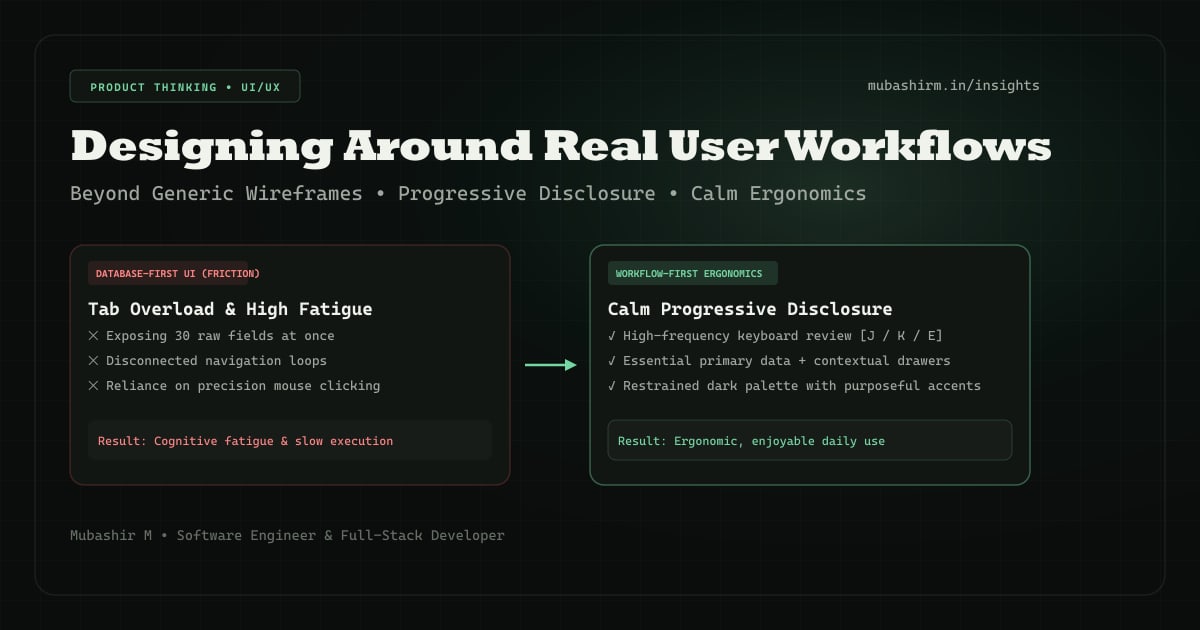
The Trap of Feature-First Design
Most software dashboards are designed around database tables rather than user intention. If a database has five related entities, the UI often presents five disjointed navigation tabs, forcing the user to mentally reconstruct the connection between their tasks.
When you observe actual users interacting with complex software — whether it is a stock trader reviewing a morning session, a recruiter triaging candidate resumes, or an operations manager approving invoices — they rarely navigate in linear fashion. They operate in feedback loops: scanning, filtering, deciding, and moving to the next item.
1. Progressive Disclosure: Respecting Attention
Progressive disclosure is the practice of presenting only the essentials for the current task, while making secondary details and advanced controls accessible without page navigation.
When designing data-dense applications, avoid the temptation to display every available field in a primary table row. Instead, use visual hierarchy: bold primary identifiers, muted metadata, and contextual quick-view slideouts for deep inspection.
2. Keyboard Ergonomics for High-Frequency Loops
In tools where users spend hours every day (such as trading journals, ERP workflows, or code editors), reliance on a mouse creates physical and mental friction.
Providing keyboard shortcuts for repetitive actions transforms an interface from a chore into an ergonomic workspace. In modern web apps, implementing global shortcut listeners with proper input focus guards makes high-volume workflows effortless.
// Lightweight keyboard listener pattern for workflow efficiency
useEffect(() => {
  const handleKeyDown = (e: KeyboardEvent) => {
    // Avoid triggering shortcuts when user is typing inside form inputs
    const target = e.target as HTMLElement;
    if (['INPUT', 'TEXTAREA'].includes(target.tagName) || target.isContentEditable) {
      return;
    }

    if (e.key === 'j' || e.key === 'ArrowDown') selectNextItem();
    if (e.key === 'k' || e.key === 'ArrowUp') selectPrevItem();
    if (e.key === 'e') openEditDrawer();
  };

  window.addEventListener('keydown', handleKeyDown);
  return () => window.removeEventListener('keydown', handleKeyDown);
}, []);
3. Reducing Cognitive Load Through Calm Aesthetics
Vibrant colors should be reserved for actionable intent or critical state changes (such as warnings, success confirmations, or active selections). When every badge, button, and header competes with bright neon hues, user fatigue increases quickly.
A restrained palette — deep dark backgrounds, subtle border dividers, and purposeful accent greens — creates a calm atmosphere where real data stands out naturally.
“The best user interfaces do not draw attention to themselves; they disappear into the user's natural train of thought.”
Conclusion
Great software engineering is not solely about algorithms or backend latency; it is about empathy for the person sitting on the other side of the glass. When you design around user workflows rather than wireframe checklists, you build software people genuinely enjoy returning to.
FindMyStock — Market Research Workspace
A focused workspace built around calm information hierarchy and chart-led discovery without visual noise.
Explore this project in my showcase